
Curious about how to join RuneScape private servers but not sure where to begin? Private servers offer unique gameplay experiences with custom content, faster progression, and specialized communities that differ from the official RuneScape game. This comprehensive guide will walk you through everything you need to know about finding, joining, and enjoying RSPS safely and effectively.
What Are RuneScape Private Servers?

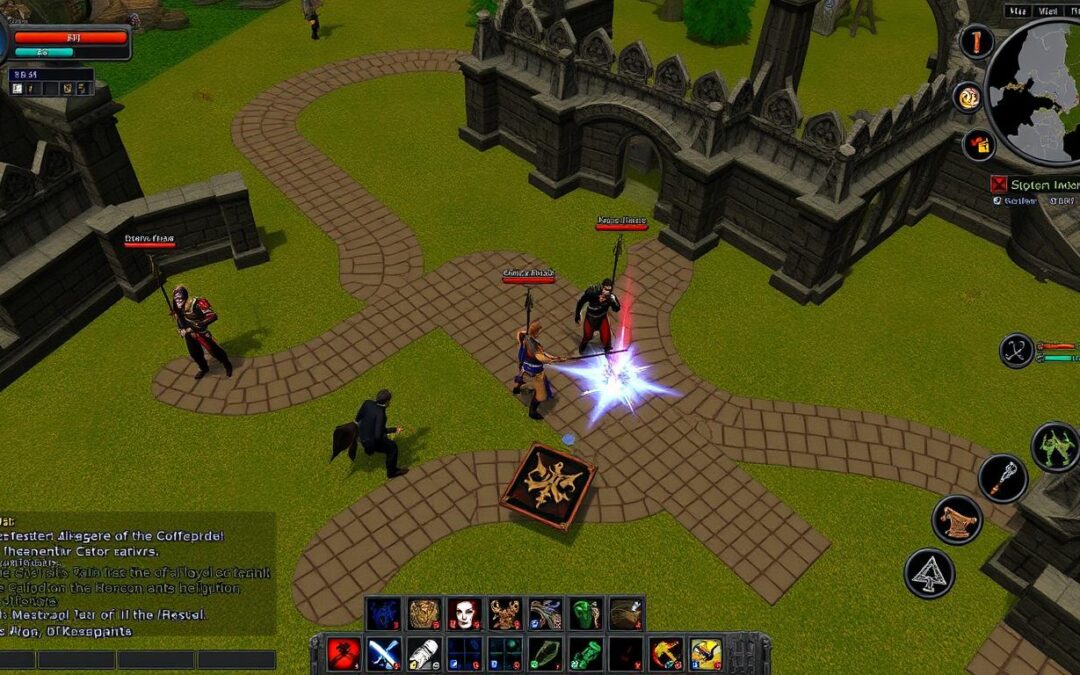
A typical RuneScape private server with custom interface and content
RuneScape private servers (RSPS) are player-created and maintained versions of the popular MMORPG RuneScape. Unlike the official game developed by Jagex, these servers are operated by independent developers who modify the game to create unique experiences. Private servers typically offer customized content, increased experience rates, unique items, and specialized gameplay modes that aren’t available in the official game.
Key Differences from Official RuneScape
Official RuneScape
- Developed and maintained by Jagex
- Standard progression rates
- Official content updates
- Larger player base
- Subscription-based model
Private Servers
- Community-developed and maintained
- Accelerated progression (often 10x-100x faster)
- Custom content and unique bosses
- Specialized communities
- Usually free to play
Ready to Experience Custom Content?
Discover the top RuneScape private servers with unique gameplay features, custom bosses, and active communities.
Explore Top RSPSHow to Find RuneScape Private Servers
The first step in learning how to join RuneScape private servers is finding the right one for your gameplay preferences. With hundreds of options available, it’s important to research before committing to a server.

RSPS toplists help you find popular and active servers
Best Resources for Finding RSPS
- RSPS Toplists – Websites like RSPS-List and RuneList rank servers by popularity and player votes
- Gaming Forums – Communities like Reddit’s r/RSPS or RuneScape forums often discuss private servers
- YouTube Showcases – Content creators frequently review and showcase popular servers
- Discord Communities – Many RSPS-focused Discord servers list and discuss various options
What to Look for When Choosing a Server
Player Count
Active servers with 100+ concurrent players typically offer better economies and community experiences.
Update Frequency
Servers with regular updates show active development and long-term sustainability.
Game Version
Choose between OSRS-style, RS3, Pre-EOC, or custom hybrid servers based on your preference.
Step-by-Step Guide: How to Join RuneScape Private Servers
Following these steps will help you successfully join and play on RuneScape private servers. The process is relatively straightforward but requires careful attention to detail.

Visual guide to joining an RSPS
-
Choose Your Server
Research and select a server that matches your preferred gameplay style (PvP, PvM, skilling, etc.) and has a healthy player population.
-
Visit the Official Website
Always access the server through its official website to avoid malicious downloads. Most RSPS websites can be found through toplists or their Discord servers.
-
Create an Account
Register on the server’s website or through their client. Important: Never use the same username and password as your official RuneScape account.

Typical account creation form for an RSPS
-
Download the Client
Download the game client from the official server website. Most RSPS use custom clients or modified RuneLite clients.
-
Install the Client
Run the installer or extract the files if it’s a portable client. Some servers may require Java to be installed on your computer.
-
Launch and Log In
Open the client, enter your newly created username and password, and log in to begin playing.
Pro Tip: Server Commands
Once logged in, type ::commands in the chat to see a list of available server commands. Most RSPS use commands like ::home to teleport to the main hub or ::shops to access stores.
Comparison of Popular RuneScape Private Servers
When deciding how to join RuneScape private servers, it’s helpful to compare popular options. Here’s a breakdown of some well-established servers to help you make an informed choice.
| Server Name | Features | Player Base | Difficulty to Join |
| Ferox | OSRS-based, all 3 raids, mobile support, seasonal events, 10b+ monthly rewards | 1000+ concurrent players | Easy – Simple download and registration |
| Alora | 100% Tombs of Amascut, Theatre of Blood, Chambers of Xeric, mobile support | 500-800 concurrent players | Easy – RuneLite integration |
| ROAT-PKZ | PvP-focused, gambling features, latest OSRS items, active wilderness | 300-500 concurrent players | Easy – Quick setup |
| Redemption | 100+ custom bosses, minigames, raids, mobile support | 200-400 concurrent players | Medium – Larger client download |
| Velheim | Pre-EoC focused, Elite Dungeons, Archaeology, Invention skills | 100-300 concurrent players | Medium – Requires specific Java version |

Visual comparison of different RSPS interfaces and styles
Find Your Perfect Server
Browse the most popular RuneScape private servers and find one that matches your preferred gameplay style.
Browse Top ServersSafety Considerations When Joining RSPS
Understanding how to join RuneScape private servers safely is crucial to protect your personal information and devices. While many servers are legitimate, there are potential risks to be aware of.

Prioritize security when downloading RSPS clients
Safety Practices
- Only download clients from official server websites
- Use unique usernames and passwords for each server
- Never use your official RuneScape credentials
- Run antivirus scans on downloaded files
- Research server reputation before joining
- Use a VPN for additional security
Warning Signs
- Servers requiring official RuneScape login details
- Clients that trigger antivirus warnings
- Websites with excessive pop-ups or redirects
- Servers with very few players or reviews
- Requests for personal information beyond username
- Suspicious Discord servers with limited history
Important Security Note
Never enter your official RuneScape account details on any private server. Always create new, unique credentials for each RSPS you join to protect your main account and personal information.
Legal Aspects of RuneScape Private Servers
Before learning how to join RuneScape private servers, it’s important to understand the legal considerations surrounding them.

Understanding the legal status of RSPS
RuneScape private servers exist in a legal gray area. While playing on them isn’t illegal for users in most jurisdictions, the servers themselves operate without Jagex’s permission and may violate intellectual property rights. Here are some key legal points to consider:
- Terms of Service: Playing on private servers technically violates Jagex’s Terms of Service for RuneScape
- Account Risk: Jagex has the right to ban official accounts if they discover you play on private servers
- Server Ownership: Running a private server could potentially expose server owners to legal action from Jagex
- Payment Considerations: Be cautious about servers that charge real money for in-game advantages
“While players typically don’t face legal consequences for playing on private servers, it’s important to understand that these servers operate outside of Jagex’s official ecosystem and may be shut down without notice.”
Pros and Cons of Playing on Private Servers
Now that you understand how to join RuneScape private servers, consider these advantages and disadvantages before diving in.

Custom content is a major draw for RSPS players
Advantages
- Accelerated Progression: Faster XP rates and drop rates mean less grinding
- Custom Content: Unique bosses, items, and gameplay mechanics not found in official RuneScape
- Community Focus: Smaller, often more tight-knit communities
- Free to Play: Most servers are completely free with optional donations
- Specialized Gameplay: Servers focused on specific aspects like PvP, skilling, or ironman modes
- Nostalgia: Access to older versions of the game that are no longer officially available
Disadvantages
- Stability Issues: Servers may experience downtime or shut down permanently
- Security Risks: Potential for malware in client downloads
- Limited Support: Less robust customer support compared to official game
- Smaller Player Base: Fewer players than the official game
- Bugs and Glitches: More common due to smaller development teams
- Legal Uncertainty: Servers may be shut down by Jagex
Getting Started After Joining
Once you’ve learned how to join RuneScape private servers and have successfully logged in, here are some tips to help you get started and make the most of your experience.

Starting your journey on an RSPS
Essential First Steps
- Type ::commands: Learn the available server commands
- Join Help Chat: Most servers have a clan chat or Discord for new players
- Complete Tutorials: Follow any starter guides or tutorials offered
- Check Starter Areas: Look for free starter gear or items
- Set Game Modes: Some servers let you choose XP rates or gameplay modes
Common RSPS Commands
Navigation Commands
- ::home – Teleport to main hub
- ::shops – Access server shops
- ::train – Go to training areas
Utility Commands
- ::bank – Open your bank
- ::restore – Restore health/prayer
- ::claim – Claim vote rewards
Social Commands
- ::yell – Server-wide message
- ::staff – Contact staff
- ::discord – Get Discord link

Typical command list in an RSPS
Need Help Getting Started?
Join our Discord community where experienced players can answer your questions and help you get started on your favorite RSPS.
Join Discord CommunityJoining the RSPS Community
A significant part of learning how to join RuneScape private servers is becoming part of the community. Most servers have active Discord channels, forums, and in-game clan chats where players can connect.

Community events are common on popular RSPS
Ways to Get Involved
- Join the Discord: Most servers have active Discord communities
- Participate in Events: Many servers host regular PvP tournaments, boss hunts, or skilling competitions
- Join a Clan: In-game clans offer support, shared resources, and group activities
- Follow Development: Stay updated on server updates through forums or social media
- Provide Feedback: Many server owners welcome player suggestions
Community Etiquette
RSPS communities are typically smaller and more tight-knit than the official game. Be respectful, follow server rules, and help new players to maintain a positive environment. Many servers have strict rules against scamming, harassment, and disruptive behavior.
Frequently Asked Questions
Here are answers to common questions about how to join RuneScape private servers.
Are RuneScape private servers free to play?
Yes, most RuneScape private servers are completely free to play. Some servers offer optional donation packages that provide cosmetic items or convenience features, but these are typically not required to enjoy the game.
Can I get banned from official RuneScape for playing on private servers?
Jagex cannot detect if you’re playing on a private server unless you openly admit to it. However, it does violate their Terms of Service, so discretion is advised. Never use the same login credentials for both official RuneScape and private servers.
Do I need a powerful computer to play RSPS?
Most RuneScape private servers have similar or lower system requirements than the official game. If your computer can run RuneScape, it should handle most private servers without issues. Some custom servers with enhanced graphics may require slightly better specifications.
Can I play RSPS on mobile devices?
Some RuneScape private servers now offer mobile support, particularly those based on OSRS. Check the server’s website or Discord for information about mobile compatibility and installation instructions.
What happens if a private server shuts down?
Unfortunately, if a private server shuts down, your progress and items on that server will be lost. This is one of the risks of playing on private servers. It’s advisable to choose established servers with a history of stability.
Conclusion
Learning how to join RuneScape private servers opens up a world of unique gameplay experiences beyond the official game. From accelerated progression to custom content and specialized communities, RSPS offer something for every type of RuneScape enthusiast.

The exciting possibilities of RSPS endgame content
Remember to prioritize safety by downloading clients only from official sources, using unique credentials, and researching servers before joining. While there are legal considerations to be aware of, millions of players enjoy RSPS as an alternative or supplement to the official RuneScape experience.
Whether you’re looking for nostalgic gameplay, accelerated progression, or unique custom content, there’s likely a private server that matches your preferences. By following the steps outlined in this guide, you’ll be well-equipped to find, join, and enjoy the perfect RuneScape private server for your gaming style.
Ready to Start Your RSPS Adventure?
Explore the top RuneScape private servers, join communities, and discover unique gameplay experiences today!
Start Your RSPS Journey